

The First Encounter
Unboxing the Razer DeathStalker V2 Pro was an experience in itself. The sleek design and the promise of high performance had me excited. As a gamer and a developer, I had high expectations. Could this keyboard be the all-in-one solution I was looking for?
The Key to Success: Linear, Optical, and Low-Profile
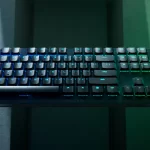
One of the first things I noticed was the unique key design. The keys are linear, optical, and low-profile, offering a smooth and quick actuation. You have two options: red for smooth and silent, or purple for crisp and clicky. I opted for the red keys, which are perfect for office settings where silence is golden. The low-profile design also adds to the ergonomic benefits, reducing wrist strain during long coding or gaming sessions.
The Honeymoon Phase
The first few days were nothing short of amazing. The keys felt responsive, and the minimalistic design was a perfect fit for my setup. The HyperSpeed dongle was a game-changer, offering latency-free gaming that felt as good as a wired connection. The Bluetooth feature was the icing on the cake, making it a breeze to switch between my gaming rig and work laptop.
The Roller Coaster
But it wasn’t all smooth sailing. My initial unit had a defective multi-function roller. Just when I thought I’d have to return it, Amazon came to the rescue with a quick replacement. The new unit was perfect, and I was back in action.
The Daily Grind
As a developer, this keyboard has become indispensable to me. Its impressive battery life easily keeps up with my long work hours and late-night gaming sessions. However, there is a minor hiccup that I’ve noticed: the keyboard takes about 2 seconds to wake up from sleep. While this may not seem like a lot, it can be a bit jarring when you’re deeply engrossed in your work or in the middle of an intense game.
The Charging Quirk
Here’s something to note: when you plug in the USB-C cable for charging, the keyboard switches to a wired connection, disabling the wireless features. This can be a bit inconvenient, especially if you’re using Bluetooth to connect to other devices.
Options Galore
If you’re looking for something more compact, Razer also offers a tenkeyless version of the DeathStalker V2 Pro. It comes without the numeric keys, making it a great option for those with limited desk space.
The Verdict
My Rating: 🐱🐱🐱🐱 4/5
Overall, the Razer DeathStalker V2 Pro has been a reliable and versatile addition to my setup. It’s not perfect. The 2-second wake-up time and the initial issue with the multi-function roller were minor setbacks. However, the pros far outweigh the cons, making it deserving of a 4 out of 5 cat rating.